
My Instant Pot has become my do it all cooking appliance. It's great for stews, soups, braised vegetables and meats, and sides. To take your Instant Pot skills to the next level, you gotta know how to brown meat.
If you’ve used the saute mode to brown meat in your Instant Pot then you’ve likely encountered the seemingly hard to avoid the problem of sticking. This is especially a problem with skin-on chicken.
Browning meat is such a critical step to adding flavor and depth to a dish so skipping the step is not an option unless you want food sub-optimized for flavor.
Straight-up as frustrating as it is to try and flip that chicken, only to leave that delicious and beautiful brown skin behind stuck to the bottom of your pan, there is a simple way around this.
What Is Browning
Browning is a cooking process for quickly cooking the surface of meat to give it color, crusty texture, and flavor. It involves cooking with a small amount of fat at relatively high heat.
This is an important step in braising meats or pressure cooking. Done before pressure cooking browning provides the added benefit of preserving moisture.
Recipe Examples of How To Brown Chicken In An Instant Pot
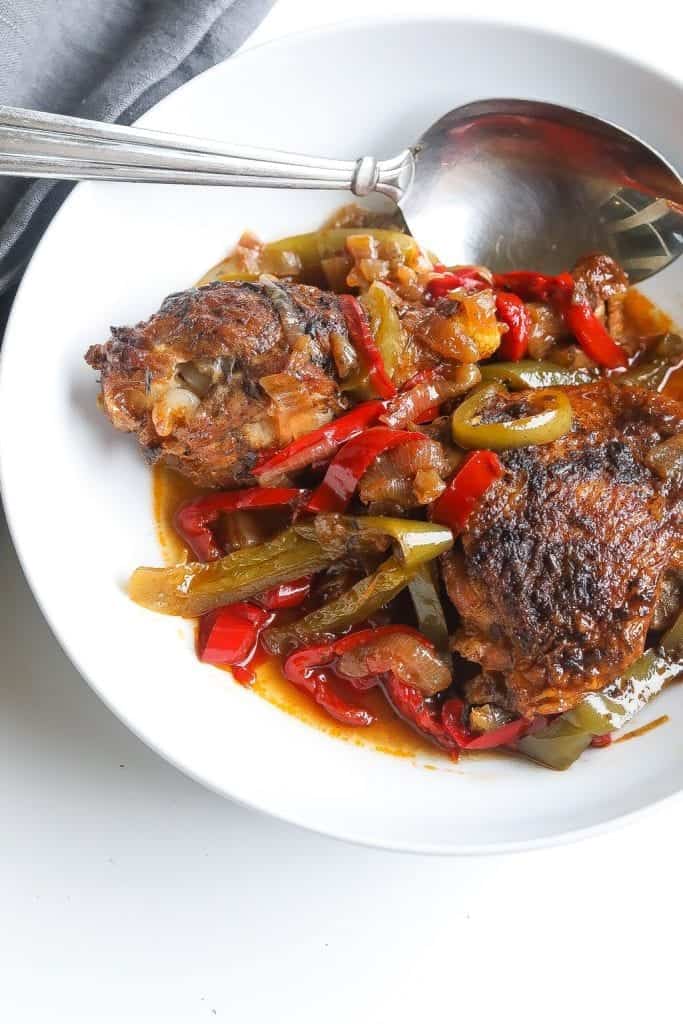
Instant Pot Jamaican Brown Stew Chicken - Food Fidelity
Instant Pot Jerk Chicken - Food Fidelity
Recipe Examples of How To Brown Beef In An Instant Pot
Instant Pot Beef Short Ribs - Food Fidelity
Instant Pot Oxtails - Food Fidelity
Browning ground meat is so much easier than whole cuts of meats of meat like steak, chops, chicken pieces, etc. Browning ground beef is probably most common, but whether ground beef, ground lamb, or ground poultry it's all the same. Generally want to heat an oil like vegetable oil or olive over medium high heat then add the raw meat until it is sufficiently browned.
Why does browning cause stickiness?
Meat sticking during the browning process is not limited to Instant Pots. Skillets, pans, etc. all present the same challenges if certain techniques aren’t used.
Stickiness isn’t failure—it’s impatience being corrected.
- Let meat stick
- Let it brown
- Let it release
That sticky phase is what gives you:
- Deep color
- Savory crust
- Fond for gravy, pan sauce, or pot liquor–style depth
Instant Pot Saute Settings
Instant Pots have all kinds of features and settings. After experimenting with all the different functions, I’ve settled on the fact that 97% of your Instant Pot cooking needs can be solved with just two settings - 1. : "Manual” pressure cooking and 2. “Saute”
The saute setting is what’s used for browning meat and sautéing vegetables before cooking. Most newer instant pots come with advanced settings which include 3 levels of temperature:
- “Normal” for regular browning
- “More” for darker browning
- “Less” for light browning
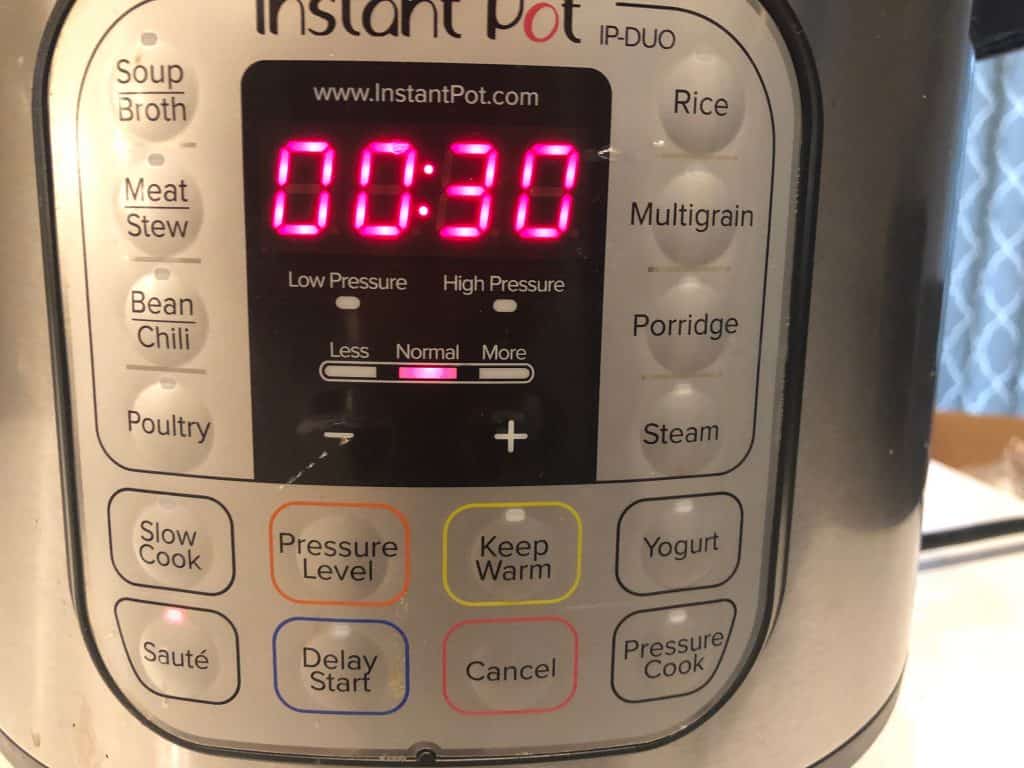
More often than not “normal” mode is sufficient. However, for skin-on chicken I find that the “more” setting works best. There is some variability depending on temperature of the meat prior to cooking as well as amount of surface moisture. If after browning a while with no releasing you can reduce temperature by switching to the “Less” settings
During sautéing keep the lid open at all time to avoid pressure building up.
To use the “Sauté” settings follow the below steps:
- Press the “Sauté” function key and heat the IP first before adding anything to it
- Select the desired temperature with the “Adjust” key for “Normal”, “More” or “Less”
- Add oil once the Instant Pot reaches the desired temperature. This will be obvious as it will display “Hot” indicating you can start browning the meat.
- A full “Sauté” session will run for 30 minutes. You can cancel it at any time by pressing the “Cancel/Keep Warm” setting
How to brown chicken in Instant Pot without sticking including Step-by-Step Instructions
After much trial and error as well as research, I’ve arrived at a solution. I cannot lie, it was a bitch getting here, but my pain is your gain! Follow these steps to not not only avoid effing up your chicken, but actually maximizing flavor in whatever chicken dish you’re making.
Step 1: Heat the pan FIRST using “More” saute setting
Step 2: Add the oil ONLY AFTER POT HAS REACHED DESIRED TEMP LEVEL and make sure the entire pan’s surface is covered with a thin coating
Step 3: Allow the oil to heat properly before adding the meat. YOU WANT HOT OIL FIRST!
Step 4: Add the chicken to the outer areas where the oil collects and cook skin side down (4 minutes)
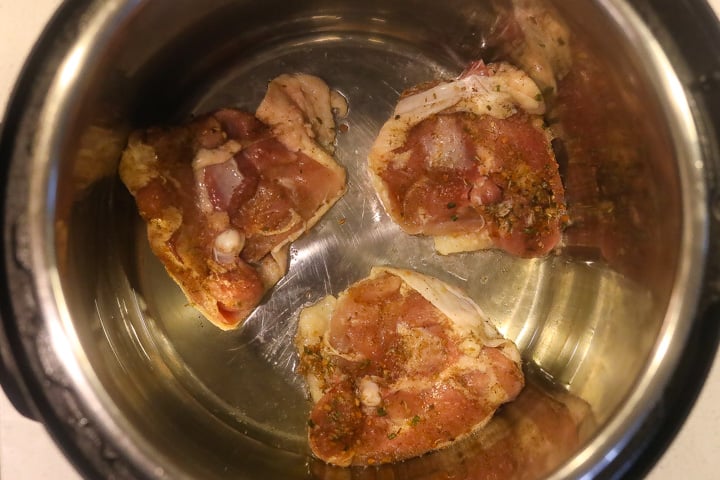
Step 5: WAIT. WAIT SOME MORE before flipping. Any sticking means chicken ain’t ready for the FLIP. You can use your tongs to test for release. Cook for about 2 minutes.
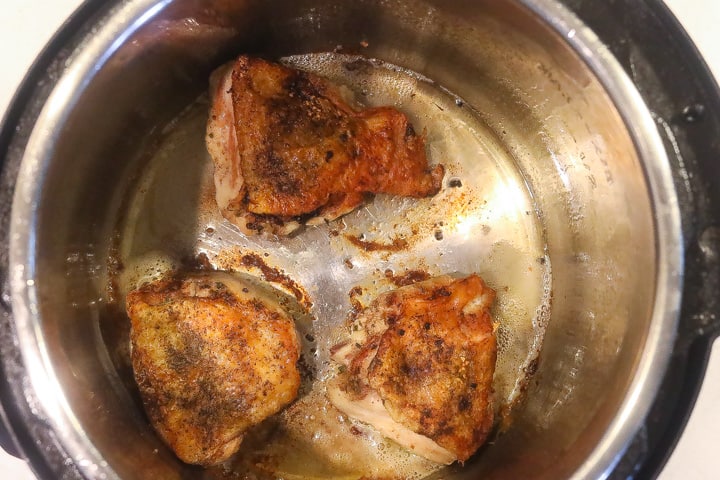
Key Tips to prevent meat from sticking in an IP
In principle following the above-mentioned tips apply to the Instant Pot as well. However, the Instant Pot does produce one unique problem. The crown in the middle of the pot makes it hard to coat the entire bottom surface area. Instead, the oil/fat collects in the outer surface area. Given this there are a couple of solves:
- Don’t swim against the current; just position your meat in the areas the oil naturally collects
- Oil the meat
- Lift the pan and swirl the oil around
- Use a silicone brush to “paint” the bottom of the pan with oil
- Saute on the highest setting for skin-on chicken
- A hot pan requires less oil to cover the surface
- Hot oil is less viscous so the faster the oil reaches temp the better
- Less oil will be also be needed to fill the micro-crevices in the pan resulting in better buffer between food and pan surface
How will I know when the pan is hot enough?
Just for the IP settings to read “Hot.” For non-Instant Pot cooking, you can use the water drop test. Just flick water from your fingertips. If the pan is hot enough, the water will vaporize on the spot.
How Do I Avoid Burning the Meat?
Listen for that cracklin’ sizzling sound. NO MO Sizzle sound means you’re vulnerable to burning at that point.
Should I Deglaze?
One of the benefits of a good browning is the sticky brown bits left behind. There is sooooo much flavor here, so you’ll want to deglaze the pan with a stock and/or acidic liquid like wine or vinegar.
Deglazing refers to add the liquid and then using a wooden spoon/spatula to scrape up the brown bits, then cooking the sauce before adding the chicken back for final cooking.
In Summary - to brown your chicken without it sticking to the pan just saute pan until it reads “hot”, add your oil and let it heat a few minutes, then add the dry, room temperature meat and flip after a few minutes. Just don't try to move it too soon. When it's properly browned, it will release.
It’s as simple as that to brown chicken that doesn’t stick to the bottom of your Instant Pot pan!
You can also keep up with my food exploits as well as original recipes! You can find me on Instagram, Facebook, Twitter, and Pinterest. If you like any of the music you find on the site, visit me at Spotify to find curated monthly playlists.
Leave a comment